arrow-left

All pages
gitbookPowered by GitBook
1 of 18

Loading...

Loading...

Loading...

Loading...

Loading...

Loading...

Loading...

Loading...

Loading...

Loading...

Loading...

Loading...

Loading...

Loading...

Loading...

Loading...

Loading...

Loading...

Examples

Simple Recorder

hashtag
SimpleRecorder

SimpleRecorderarrow-up-right

This is a very simple example for Flutter Sound beginners, that shows how to record, and then playback a file.

This example is really basic.

The complete example source

is therearrow-up-right

Examples

Sound Effects

hashtag
soundEffect

soundEffectarrow-up-right

startPlayerFromStreamarrow-up-right can be very efficient to play sound effects in real time. For example in a game App. In this example, the App open the Audio Session and call startPlayerFromStream() during initialization. When it want to play a noise, it has just to call the synchronous verb feed. Very fast.

The complete example source

is therearrow-up-right

examples

api

sdk_footer_text

• cc licensearrow-up-right

static-assets

highlight.js

Generated from https://highlightjs.org/download/arrow-up-right on 2019-05-16

Included languages:

  • bash

  • css

  • dart

  • html, xml

  • java

  • javascript

  • json

  • kotlin

  • markdown

  • objective-c

  • shell

  • swift

  • yaml

Examples

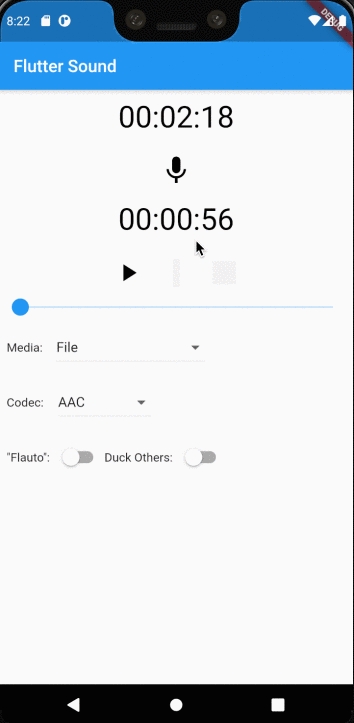
Flutter Sound Demo.

hashtag
Demo

Demoarrow-up-right

This is a Demo of what it is possible to do with Flutter Sound. The code of this Demo app is not so simple and unfortunately not very clean :-( .

Flutter Sound beginners : you probably should look to SimplePlaybackarrow-up-right and SimpleRecorderarrow-up-right

The biggest interest of this Demo is that it shows most of the features of Flutter Sound :

  • Plays from various media with various codecs

  • Records to various media with various codecs

  • Pause and Resume control from recording or playback

It would be really great if someone rewrite this demo soon

The complete example source

Examples

Widget UI

hashtag
WidgetUIDemo

WidgetUIDemoarrow-up-right

This is a Demo of an App which uses the Flutter Sound UI Widgets.

My own feeling is that this Demo is really too much complicated for doing something very simple. There is too many dependencies and too many sources.

I really hope that someone will write soon another simpler Demo App.

The complete example source

Ï„ under Flutter

The τ Project under Flutter.

hashtag
Flutter Sound

pub version

Flutter Sound is the first (and actually the only) implementation of the Ï„ Project. This Flutter plugin is supported by :

  • iOS

  • Android

  • Flutter Web

Maybe, one day, we will be supported by Linux, Macos, and even (why not) Windows. But this is not top of our priorities.

hashtag
Flutter Sound branches

We actually maintain two branches for Flutter Sound :

  • The V5 branch (the version ^5.0.0)

  • The master branch (actually the version ^6.0.0)

hashtag
SDK requirements

  • Flutter Sound requires an iOS 10.0 SDK (or later)

  • Flutter Sound requires an Android 21 (or later)

hashtag
Examples (Demo Apps)

Flutter Sound comes with several Demo/Examples :

is a driver which can call all the various examples.

Examples

Playback From Stream (2)

hashtag
livePlaybackWithBackPressure

livePlaybackWithBackPressurearrow-up-right

A very simple example showing how to play Live Data with back pressure. It feeds a live stream, waiting that the Futures are completed for each block.

This example get the data from an asset file, which is completely stupid : if an App wants to play an asset file he must use "StartPlayerFromBuffer().

If you do not need any back pressure, you can see another simple example : . This other example is a little bit simpler because the App does not need to await the playback for each block before playing another one.

The complete example source

Examples

RecordToStream

hashtag
RecordToStream

This is an example showing how to record to a Dart Stream. It writes all the recorded data from a Stream to a File, which is completely stupid: if an App wants to record something to a File, it must not use Streams.

The real interest of recording to a Stream is for example to feed a Speech-to-Text engine, or for processing the Live data in Dart in real time.

Examples

Playback From Stream(1)

hashtag
livePlaybackWithoutBackPressure

A very simple example showing how to play Live Data without back pressure. It feeds a live stream, without waiting that the Futures are completed for each block. This is simpler than playing buffers synchronously because the App does not need to await that the playback for each block is completed playing another one.

This example get the data from an asset file, which is completely stupid : if an App wants to play a long asset file he must use

Shows how to use a Stream for getting the playback (or recoding) events
  • Shows how to specify a callback function when a playback is terminated,

  • Shows how to record to a Stream or playback from a stream

  • Can show controls on the iOS or Android lock-screen

  • ...

  • is therearrow-up-right
    is therearrow-up-right
    LivePlaybackWithoutBackPressure.dartarrow-up-right
    is therearrow-up-right
    The complete example source is therearrow-up-right
    RecordToStreamarrow-up-right
    .

    Feeding Flutter Sound without back pressure is very simple but you can have two problems :

    • If your App is too fast feeding the audio channel, it can have problems with the Stream memory used.

    • The App does not have any knowledge of when the provided block is really played.

      For example, if it does a "stopPlayer()" it will loose all the buffered data.

    This example uses the FoodEventarrow-up-right object to resynchronize the output stream before doing a stopPlayer()arrow-up-right

    The complete example source is therearrow-up-right

    livePlaybackWithoutBackPressurearrow-up-right
    startPlayer()arrow-up-right
    The examples Apparrow-up-right
    Demo

    Flutter Sound on Flutter Web

    Flutter Sound on web.

    Flutter Sound is now supported by Flutter Web (with some limitations). Please go to there to have informations on how to setup your App for web.

    The big problem (as usual) is Apple. Webkit is bull shit : you cannot use MediaRecorder to record anything with it. It means that Flutter Sound on Safari cannot record. And because Apple forces Firefox and Chrome to use also Webkit on iOS, you cannot record anything on iOS with Flutter Sound. Apple really sucks :-(.

    You can play with this live demo on the webarrow-up-right, but better if not Safari and not iOS if you want to record something.

    hashtag
    Player

    • Flutter Sound can play buffers with startPlayerFromBuffer(), exactly like with other platforms. Please refer to

    • Flutter Sound can play remote URL with startPlayer(), exactly like with other platforms. Again, refer to

    The web App does not have access to any file system. But you can store an URL into your local SessionStorage, and use the key as if it was an audio file. This is compatible with the Flutter Sound recorder.

    hashtag
    Recorder

    Flutter Sound on web cannot have access to any file system. You can use startRecorder() like others platforms, but the recorded data will be stored inside an internal HTTP object. When the recorder is stopped, startRecorder stores the URL of this object into your local sessionStorage.

    Please refer to : Flutter Sound Recorder does not work on Safari nor iOS.

    Limitations :

    • Recording to a Dart Stream is not yet implemented

    • Flutter Sound does not have access to the audio focus

    • Flutter Sound does not provide the audio peak level in the Recorder Progress events.

    hashtag
    FFmpeg

    Actually, Flutter Sound on Web does not support FFmpeg. We are still actually not sure if we should support it or if the code weight would be too high for a Web App.

    Installation

    Flutter Sound installation.

    hashtag
    Install

    For help on adding as a dependency, view the documentationarrow-up-right.

    hashtag
    Flutter Sound flavors

    Flutter Sound comes in two flavors :

    • the FULL flavor : flutter_sound

    • the LITE flavor : flutter_sound_lite

    The big difference between the two flavors is that the LITE flavor does not have mobile_ffmpeg embedded inside. There is a huge impact on the memory used, but the LITE flavor will not be able to do :

    • Support some codecs like Playback OGG/OPUS on iOS or Record OGG_OPUS on iOS

    • Will not be able to offer some helping functions, like FlutterSoundHelper.FFmpegGetMediaInformation() or FlutterSoundHelper.duration()

    Here are the size of example/demo1 iOS .ipa in Released Mode. Those numbers include everything (flutter library, application, ...) and not only Flutter Sound.

    hashtag
    Linking your App directly from pub.dev

    Add flutter_sound or flutter_sound_lite as a dependency in pubspec.yaml.

    The actual versions are :

    • flutter_sound_lite: ^5.0.0 (the LTS version without FFmpeg)

    • flutter_sound: ^5.0.0 (the LTS version with FFmpeg embedded)

    • flutter_sound_lite: ^6.0.0 (the current version without FFmpeg)

    or

    hashtag
    Linking your App with Flutter Sound sources (optional)

    The Flutter-Sound sources .

    There is actually two branches :

    • V5. This is the Long Term Support (LTS) branch which is maintained under the version 5.x.x

    • master. This is the branch currently developed and is released under the version 6.x.x.

    If you want to generate your App from the sources with a FULL flavor:

    and add your dependency in your pubspec.yaml :

    If you prefer to link your App with the LITE flavor :

    and add your dependency in your pubspec.yaml :

    hashtag
    FFmpeg

    flutter_sound FULL flavor makes use of flutter_ffmpeg. In contrary to Flutter Sound Version 3.x.x, in Version 4.0.x your App can be built without any Flutter-FFmpeg dependency. flutter_ffmpeg audio-lts is now embedding inside the FULL flutter_sound.

    If your App needs to use FFmpeg audio package, you must use the embedded version inside flutter_sound instead of adding a new dependency in your pubspec.yaml.

    If your App needs an other FFmpeg package (for example the "video" package), use the LITE flavor of Flutter Sound and add yourself the App dependency that you need.

    hashtag
    Post Installation

    • On iOS you need to add usage descriptions to info.plist:

    • On Android you need to add a permission to AndroidManifest.xml:

    hashtag
    Flutter Web

    To use Flutter Sound in a web application, you can either :

    hashtag
    Static reference

    Add those 4 lines at the end of the <head> section of your index.html file :

    hashtag
    or Dynamic reference

    Add those 4 lines at the end of the <head> section of your index.html file :

    Please to understand how you can specify the interval of the versions you are interested by.

    hashtag
    Troubles shooting

    hashtag
    Problem with Cocoapods

    If you get this message (specially after the release of a new Flutter Version) :

    you can try the following instructions sequence (and ignore if some commands gives errors) :

    If everything good, the last pod install must not give any error.

    Examples

    Simple Playback

    hashtag
    SimplePlayback

    SimplePlaybackarrow-up-right

    This is a very simple example for Flutter Sound beginners, that shows how to play a remote file.

    This example is really basic.

    The complete example source

    Examples

    Stream Loop

    hashtag
    streamLoop

    streamLooparrow-up-right

    streamLoop() is a very simple example which connect the FlutterSoundRecorder sink to the FlutterSoundPlayer Stream. Of course, we do not play to the loudspeaker to avoid a very unpleasant Larsen effect. this example does not use a new StreamController, but use directely foodStreamController from flutter_sound_player.dart.

    The complete example source

    is therearrow-up-right
    is therearrow-up-right
    Playing from a Dart Stream with startPlayerFromStream()is not yet implemented.
  • Playing with UI is obviously not implemented, because we do not have control to the lock screen inside a web app.

  • Flutter Sound does not have control of the audio-focus.

  • the codecs compatibility tablearrow-up-right
    the codecs compatibility tablearrow-up-right
    the codecs compatibility tablearrow-up-right
    flutter_sound: ^6.0.0 (the current version with FFmpeg)

    Flavor

    V4.x

    V5.1

    LITE

    16.2 MB

    17.8 MB

    FULL

    30.7 MB

    32.1 MB

    are herearrow-up-right
    read thisarrow-up-right
    await startRecorder(codec: opusWebM, toFile: 'foo'); // the LocalSessionStorage key `foo` will contain the URL of the recorded object
    ...
    await stopRecorder();
    await startPlayer('foo'); // ('foo' is the LocalSessionStorage key of the recorded sound URL object)
    dependencies:
      flutter:
        sdk: flutter
      flutter_sound: ^6.0.0
    dependencies:
      flutter:
        sdk: flutter
      flutter_sound_lite: ^6.0.0
    cd some/where
    git clone https://github.com/canardoux/tau
    cd some/where/flutter_sound
    bin/flavor FULL
    dependencies:
      flutter:
        sdk: flutter
      flutter_sound:
        path: some/where/flutter_sound
    cd some/where
    git clone https://github.com/canardoux/tau
    cd some/where/flutter_sound
    bin/flavor LITE
    dependencies:
      flutter:
        sdk: flutter
      flutter_sound_lite:
        path: some/where/flutter_sound
          <key>NSAppleMusicUsageDescription</key>
          <string>MyApp does not need this permission</string>
          <key>NSCalendarsUsageDescription</key>
          <string>MyApp does not need this permission</string>
          <key>NSCameraUsageDescription</key>
          <string>MyApp does not need this permission</string>
          <key>NSContactsUsageDescription</key>
          <string>MyApp does not need this permission</string>
          <key>NSLocationWhenInUseUsageDescription</key>
          <string>MyApp does not need this permission</string>
          <key>NSMotionUsageDescription</key>
          <string>MyApp does not need this permission</string>
          <key>NSSpeechRecognitionUsageDescription</key>
          <string>MyApp does not need this permission</string>
          <key>UIBackgroundModes</key>
          <array>
                  <string>audio</string>
          </array>
          <key>NSMicrophoneUsageDescription</key>
          <string>MyApp uses the microphone to record your speech and convert it to text.</string>
    <uses-permission android:name="android.permission.RECORD_AUDIO" />
    <uses-permission android:name="android.permission.FOREGROUND_SERVICE" />
      <script src="assets/packages/flutter_sound_web/js/flutter_sound/flutter_sound.js"></script>
      <script src="assets/packages/flutter_sound_web/js/flutter_sound/flutter_sound_player.js"></script>
      <script src="assets/packages/flutter_sound_web/js/flutter_sound/flutter_sound_recorder.js"></script>
      <script src="assets/packages/flutter_sound_web/js/howler/howler.js"></script>
      <script src="https://cdn.jsdelivr.net/npm/tau_engine@6/js/flutter_sound/flutter_sound.min.js"></script>
      <script src="https://cdn.jsdelivr.net/npm/tau_engine@6/js/flutter_sound/flutter_sound_player.min.js"></script>
      <script src="https://cdn.jsdelivr.net/npm/tau_engine@6/js/flutter_sound/flutter_sound_recorder.min.js"></script>
      <script src="https://cdn.jsdelivr.net/npm/howler@2/dist/howler.min.js"></script>
    Cocoapods could not find compatible versions for pod ...
    cd ios
    pod cache clean --all
    rm Podfile.lock
    rm -rf .symlinks/
    cd ..
    flutter clean
    flutter pub get
    cd ios
    pod update
    pod repo update
    pod install --repo-update
    pod update
    pod install
    cd ..
    flutter-sound